

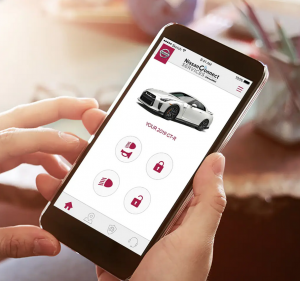
Remote Door Lock/Unlock
If you forget to lock your Nissan – or need to unlock it when you don’t have your keys handy – simply log into the NissanConnect Services app or MyNissan Owner Portal to remotely lock or unlock your doors.
What is Remote Door Lock/Unlock?
Remote Door Lock/Unlock allows you to remotely unlock or lock your Nissan’s doors through the NissanConnect Services app or MyNISSAN Owner Portal from any location. If you forget to lock your vehicle, or if you need to open it and don’t have the keys, you can send a remote request. If available in your vehicle, the doors will automatically relock if a door has not been opened within a minute after a successful remote unlock request.
In order for the Remote Door Lock/Unlock command to be successful, your vehicle must meet the following criteria:
- Engine must be off
- Doors must be closed
As an added security measure, A PIN is required before Remote Door Lock/Unlock feature can be used on the NissanConnect Services. app or MyNISSAN Owner Portal. Please secure your PIN appropriately and do not share it.
Feature benefits
To allow more time to get into your vehicle, you can send one additional unlock vehicle commands, which will extend the unlock time for 60 more seconds.
Set up notification preferences
Set up notification preferences on the NissanConnect Services App or MyNISSAN Owner Portal, and you’ll get a push notification every time a door lock/unlock command is sent to your vehicle.
Connect with us


Recent Blog Entries
- Passport Nissan VA’s Guide to Maintaining Your Nissan
- Mastering the Art of Remote Start: A Comprehensive Guide from Passport Nissan VA
- Mastering Voice Commands in Your Nissan – Unlocking the Power of Hands-Free Control
- Why Buy Nissan Certified Pre-Owned from Passport Nissan VA
- Routine Maintenance from Passport Nissan VA Keeps Your Vehicle Performing at Its Best